

Key takeaways
- Crooked usually means the bracket, not the TV. Most mounts have post-installation levelling adjustment — check that before you touch anything structural.
- Wobble is a warning, not a quirk. Movement at the wall plate means a fixing isn’t holding. Take the screen off and find out why before using it again.
- Over-tightening strips threads. Snug and firm is the target. A stripped lag bolt in a stud is worse than a loose one because it looks tight.
- Locking washers stop slow loosening. Full-motion mounts move, and movement works fasteners loose over time.
- A missed stud can’t be fixed by tightening. If a bolt spins freely, it never found timber. Re-drill into structure or fit a backer board.
A TV that hangs crooked, rocks when you touch it, or creeps away from the wall is telling you something specific. Most of the time it's a ten-minute fix with a level and a driver. Sometimes it's a bolt that never found timber, and that one doesn't get to stay above the sofa overnight.
Work out which one you've got before you pick up a tool.
- Crooked
- The wall plate sits slightly off level. Usually adjustable at the bracket without touching the wall.
- Wobbles
- A bolt at the wall plate isn't holding. Take the screen off before you use it again.
- Pulling away
- Drywall is failing around the fixings. Stop using the mount now.
- Bracket won't fit
- VESA mismatch. An adapter plate bridges most of them.
- Bolts keep loosening
- Movement on a full-motion arm. Locking washers or thread-lock.
- Cables on show
- Plan the route before the screen goes up, not after.
Before Anything Else: Is the TV Safe on the Wall?
Two faults mean the screen comes down today. Check for both before you worry about anything cosmetic.
Take the TV down if you see either of these
The wall plate has lifted off the wall. Daylight between the plate and the drywall means the fixings are pulling out. Driving another screw in beside a failing one won't hold it, because the drywall around that hole is already crushed.
A bolt spins without ever getting tight. That bolt missed the stud, or it has stripped the hole it's sitting in. Whatever's left is carrying a load it was never sized for.
Everything else on this page can wait for the weekend. These two can't.
Why Your TV Looks Crooked on the Wall
Nearly always the wall plate, not the TV. Two or three millimetres of tilt in the plate becomes a visible slope by the time it reaches the far corner of a 65-inch panel, and your eye catches it against the ceiling line every time you walk into the room.
Most brackets are built expecting this. Look along the top of the wall plate for slotted fixing holes, or for a levelling screw at one end of the rail. That adjustment is there so you can straighten the picture after the plate is already up.
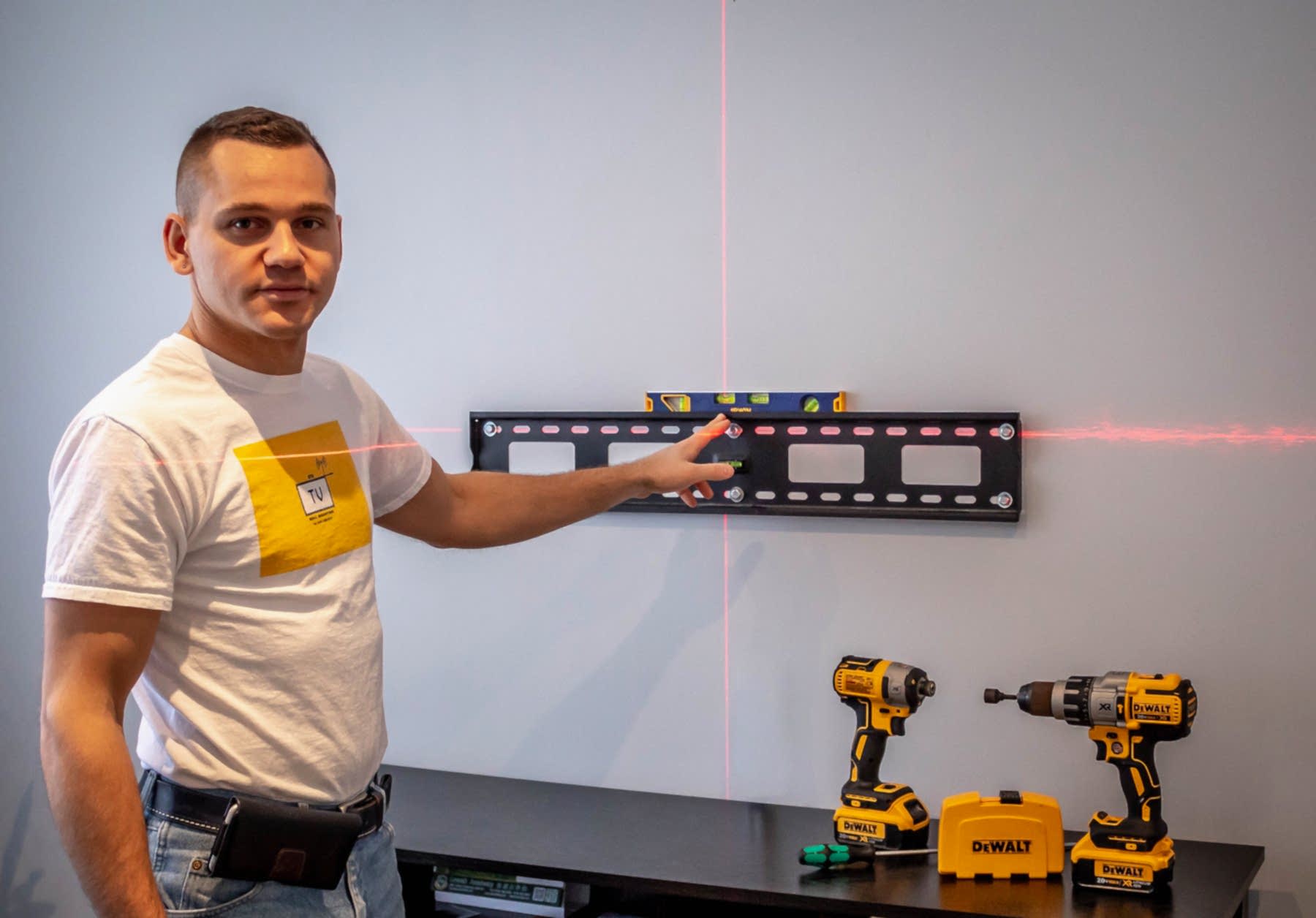
- Level the plate, not the screen. Lay the level across the wall plate itself. A level balanced on top of the TV measures the panel's frame, which isn't guaranteed square to its own mounting holes.
- Try the adjustment first. Back off the levelling screw or the slotted fixings a quarter turn, bring the rail true, re-tighten. On most mounts you can do this with the TV still hanging.
- No adjustment? The plate comes down. Mark fresh holes from a level line rather than from the old ones, and fill the originals so nothing catches when the plate goes back.
- Check the arms on a full-motion mount. Push the screen flat to the wall and look again. Arms parked at different extensions hold a panel off-square even when the plate behind them is perfect.
Your TV Wobbles or Feels Loose on the Mount
A mount fixed into solid timber doesn't move. If the screen rocks when you nudge it, something at the wall plate has stopped holding, and reaching behind to tighten the bolts you can get at is the wrong first move. You'll strip whatever grip is left.
- Take the screen off. Two people, panel face-in against something soft. You can't inspect a wall plate through a television.
- Turn every bolt by hand. You're feeling for resistance, not tightening. A bolt that spins freely for more than a thread has missed the stud or chewed out its hole.
- Move the failures into timber. Find the stud, drill a fresh pilot hole, fix into solid wood. Patch the old hole instead of leaving a bolt in it for appearances.
- Snug, then stop. Bring the plate tight against the wall and quit there.
Over-tightening is worse than loose
A loose bolt announces itself. A stripped one stays quiet. Once you've spun a lag bolt past the point where the timber grips, the head still sits flush and the plate still feels solid under your hand, but the holding power has gone. Finding a wobble is the good outcome here.
The Bracket Won't Line Up With Your TV
This is a VESA problem almost every time. VESA is the spacing of the four threaded holes on the back of your panel, written as width by height in millimetres: 400×400, 600×400, and so on. Your mount supports a range of those patterns, and a TV whose pattern falls outside that range physically won't reach the arms.

Two things catch people out when they reuse an old bracket on a newer set. Panels have got lighter, so the weight rating is rarely the blocker any more. They've also got wider, which pushes the fixing holes further apart than an older mount's arms can span. And some manufacturers recess those holes or curve the panel behind them, so you need spacers to clear the back of the TV.
A VESA adapter plate closes most of the gap and costs very little. Forcing a bracket arm outward doesn't, and neither does hanging the panel off two bolts instead of four. If you're replacing the mount anyway, our guide to fixed, tilting and full-motion brackets covers which type suits which room.
When the Mount Missed the Stud
Studs sit roughly 16 inches apart in most Toronto-area homes, and "roughly" is doing real work in that sentence. Older houses, renovated walls, and anything near a doorway or a corner will put a stud somewhere you didn't plan for. A stud finder reads density, so it flags pipework, ducting, and the seam where two sheets of drywall meet with the same confidence it flags timber.

When the studs genuinely aren't where you need them, you have three real options.
| Option | Use it when | Watch out for |
|---|---|---|
| A wider wall plate | A stud sits a few inches off your ideal centre line | It shifts the screen sideways. Check the TV still centres on the room. |
| A plywood backer board | You want freedom to position the mount anywhere along that wall | It has to span and fix into two studs, then be finished or hidden behind the panel. |
| Heavy-duty toggles | Concrete, block, or drywall with no reachable stud | Every fastener is rated by its manufacturer. Plastic drywall anchors are not in this category. |
One approach never works: leaving a bolt in bare drywall and hoping. Drywall crumbles around a loaded fastener, and re-tightening does nothing once it has. If none of the three options above suit your wall, a mounting solution that doesn't touch that wall may be the better answer.
Mount Bolts That Keep Working Loose
Common on full-motion mounts, and it isn't your imagination. Every swing of the arm loads and unloads the fasteners, and that cycling backs them off over months.
Locking washers between the bolt head and the plate fix it for most people, because the teeth bite in and resist rotation. Thread-locking compound does the same job chemically and suits the bolts you'd rather never touch again. Either way, put a re-check on any articulated mount once or twice a year. It takes two minutes with a driver.
Cables Hanging Down the Wall
Nothing undoes a level, solid install faster than four cables draped down to the console. Once the TV is up, your quick option is a surface raceway painted to match the wall. That works, and it takes about an hour.
The version people actually want, with nothing visible between the screen and the console, runs the cables inside the wall. That's far easier to plan before the plate goes on than after. If the install is already finished and you want it done properly, our invisible wire concealment service exists for exactly that.
Tools You'll Need
Five things cover almost everything on this page.
- A box or torpedo level long enough to sit across the wall plate, not just on top of the TV.
- A stud finder, plus the willingness to double-check it by knocking.
- A driver or socket set that actually fits the bolt heads. Rounding off a lag bolt turns a ten-minute job into an afternoon.
- A drill with the pilot bit your mount's instructions specify.
- Locking washers or thread-lock if you're on a full-motion mount.
Plenty of these faults trace back to a mark in the wrong place, so it's worth reading how to measure for a TV wall mount before you start. If you're troubleshooting a mount you haven't bought yet, start with choosing the right mount for your space.
When to Stop and Call a TV Mount Installer

Handle it yourself when the fix is levelling, tightening, or fitting an adapter plate. Call someone when the wall has already failed once, when you're into concrete, brick or steel studs, when a fireplace is involved, or when the panel is big enough that you can't safely lift it off the wall on your own.
GTA TV Wall Mounting has been straightening, re-fixing and finishing other people's mounting jobs across Toronto and the surrounding GTA service areas for years. We carry $2,000,000 commercial liability insurance, we're up to 50% less than comparable big-box store installation services, and every job comes with a one year material and workmanship warranty. Not sure whether you're looking at a quick adjustment or a real fixing problem? Get in touch and we'll tell you which it is.
Frequently Asked Questions
Why is my wall-mounted TV crooked?
Most likely the bracket is slightly out of level, and most mounts include a levelling adjustment on the wall plate for exactly this. Loosen it, level the screen, re-tighten.
If there's no adjustment and the plate itself is out, the wall marks were off and the plate needs to come down and go back up level.
My TV wobbles on the wall — is that normal?
No. A correctly fixed mount shouldn't move. Take the TV off and check every bolt at the wall plate. A bolt that turns without resisting has missed the stud or stripped its hole, and it needs to be relocated into solid timber.
Can I reuse my existing TV mount on a new television?
If the VESA patterns match and the new set is inside the bracket's weight and size rating, yes. Replace it if the arms are bent, the threads are stripped, or the new panel is heavier than the mount is rated for.
Will my old mount fit my new TV?
Check the VESA pattern first — newer panels are often lighter but physically wider, which can put the fixing holes outside an older bracket's arms. A VESA adapter plate bridges the gap where the difference is small.
How tight should the mount bolts be?
Firm, not forced. Tighten until the plate is solid against the wall and stop. Continuing past that point strips the thread in the timber, which quietly removes the holding power you think you have.
Why do my mount bolts keep loosening?
Common on full-motion mounts, because repeated movement works fasteners loose. Locking washers or thread-locking compound solve it. It's also worth re-checking articulated mounts once or twice a year.
The bracket doesn't line up with my TV — what now?
Check the VESA pattern against the mount's supported range. If the panel's pattern is larger or unusual, a VESA adapter plate bridges the difference. Don't force a bracket arm to fit holes it wasn't designed for.
Can I fix a missed stud without patching the wall?
Sometimes. A mount with a wider rail may reach a stud that is actually there, or a plywood backer spanning two studs gives you a solid surface to fix anywhere along. The one thing you can't do is leave a bolt in drywall and hope.